ON1 Photo RAW 2026: The Surprising Truths Behind the Hype
For years, ON1 Photo RAW has carved out a compelling niche as the powerful, subscription-free alternative to Adobe's Lightroom and Photoshop ecosystem. Its promise is simple and potent: a single, all-in-one application for photographers who want to own their software outright, combining asset management, RAW development, and advanced layer-based editing. For many, it's the holy grail of photo editing, free from the recurring costs of a subscription model.
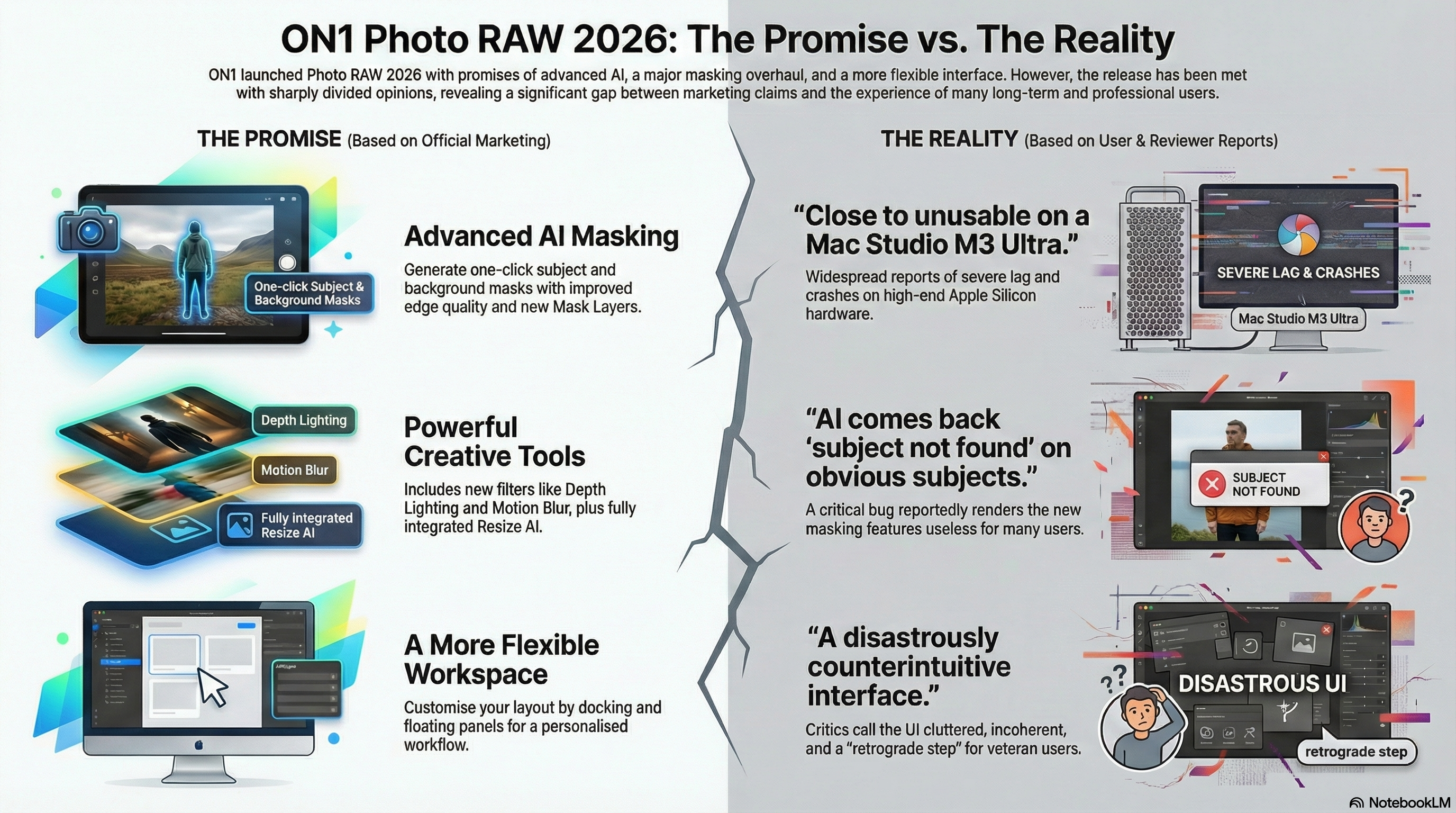
The hype surrounding the 2026 version has been particularly significant, with a marketing push heavily focused on a new suite of "Advanced AI Tools," "Smarter Masking," and a host of new creative filters. The official press releases promise a "faster, more flexible editing experience" that elevates the core tools photographers rely on every day. It’s positioned as the biggest leap forward yet, a true game-changer.
But beneath the surface of the polished marketing, a very different story is unfolding among its professional and long-term user base. Forums and community discussions reveal a deep disconnect between the software's advertised capabilities and the real-world user experience. This investigation cuts through the marketing to reveal the frustrating realities reported by its most dedicated users.
--------------------------------------------------------------------------------
1. The Performance Paradox: The Most Powerful Macs are "Close to Unusable"
One of the most startling realities of the ON1 Photo RAW 2026 launch is a deeply counter-intuitive performance problem: users with the most powerful, top-of-the-line computers are reporting the worst performance. This is not an isolated issue but a systemic failure across Apple's high-end Silicon, with users on M1 Max, M1 Ultra, M4 Pro, and M3 Ultra machines—hardware that dramatically exceeds ON1’s recommended specifications—finding the software agonizingly slow.
This is unequivocally a software optimization failure. One M1 Max user noted their machine "handles DaVinci Resolve with ease... but ON1... is struggling big time." Another on the latest M4 Pro delivered a devastating verdict, calling the experience "just awful... Uninstalled the same day." But the most damning report comes from a user whose Mac Studio M1 Ultra regressed to the speed of a decade-old computer.
"navigating in that mode is just as slow as on my 2014 iMac! takes seconds to load one file... very angry."
Investigative analysis reveals this is not a new bug but the re-emergence of an architectural flaw. The symptoms mirror complaints from 2016, when ON1 struggled to handle the high-resolution displays of the then-new 5K iMac. Instead of leveraging new hardware, ON1 Photo RAW 2026's performance on powerful machines exposes a nearly decade-old, unpatched flaw in its rendering engine when handling the high-resolution displays common to professional setups. For the very professionals who invest in high-end hardware for efficiency, the experience has become, in the words of one user, "close to unusable."
--------------------------------------------------------------------------------
2. The AI Masking Conundrum: "Subject Not Found"
A cornerstone of ON1's marketing for the 2026 version is its revamped masking engine, with the promise that isolating subjects is now "as simple as a single click." The entire suite of new features, including the sophisticated "Mask Layers" and the creative "Depth Lighting" filter, is built upon the foundation of this AI-powered subject detection.
However, multiple users report a surprising and catastrophic flaw that directly contradicts the marketing: the foundational AI subject detection is critically broken. The software often fails to identify even the most obvious subjects in a photo, generating an error that reads "subject not found."
"I'm having the problem, click 'subject' only model in the photo and comes back 'subject not found'."
The importance of this bug cannot be overstated. The entire suite of heavily marketed features, from Mask Layers to the Depth Lighting filter, collapses because the foundational AI subject detection is, for many users, functionally broken. For those experiencing this issue, the heavily marketed AI masking represents not an improvement, but an objective, functional regression that forces them back to slower, manual methods.
--------------------------------------------------------------------------------
3. The Great Divide: New "Gimmicks" While Core Tools Suffer
ON1 Photo RAW 2026 introduced a slate of new creative filters, including Motion Blur, Double Exposure, and Split Field, which were marketed as major enhancements to the user's artistic toolkit. These additions, however, have been met with a critical eye from expert users who argue that they represent misplaced priorities, labeling them as "useless AI bollocks and Tik Tok grade gimmicks" that come at the expense of refining the software's fundamental tools.
This critique is best exemplified by the state of the core raw processing sliders, which some reviewers have bluntly labeled as "third rate." The shadow slider, for instance, uses a simple "linear curve," brightening the entire image—including midtones and highlights—instead of using the superior "parametric or zonebased curves" employed by competitors to precisely target only the shadow regions. One professional reviewer, after a detailed technical comparison of the core tools against competitors, concluded with scathing clarity that they are so neglected:
"And you could probably do a better job of refining your photographs with a cement mixer."
This points to a broader "feature bloat" argument echoed within the user community. The perception is that ON1 prioritizes adding marketable "frippery" over the unglamorous but essential work of perfecting the core raw processing engine that professional photographers depend on for high-quality, predictable results.
--------------------------------------------------------------------------------
4. The User Interface Regression: An Upgrade That Requires "Relearning"
While ON1’s marketing materials promote "UI Improvements" and greater flexibility, such as the ability to dock panels on either side of the screen, the reception from veteran users has been overwhelmingly negative. Many long-term users describe the new interface as a "retrograde step" that has shattered their established workflows.
The core complaint is that the addition of new panels and features without a cohesive, holistic redesign has resulted in an experience that is "cluttered," "incoherent," and "clunky." Specific usability failures, such as needing to click a tiny "activation blob" just to use the curves tool or the illogical layout where "some tools seem to open from the left, then a toolbar up top, or below," bring this frustration to life. The result is an interface that feels busier and more complicated, breaking the "muscle memory" that professionals rely on for speed and efficiency.
"more complicated and busy that PR2025... have to completely relearn how to do the simplest functions."
This is a critical misstep for any professional software. An update that forces its most loyal users to slow down and relearn basic operations is the antithesis of an improvement. Efficiency is paramount in a professional workflow, and an interface that introduces friction where there was none before is a significant failure.
--------------------------------------------------------------------------------
5. Resize AI's Reality Check: The "Laughably Awful" Face Recovery
A major selling point of ON1 Photo RAW 2026 is the full, non-destructive integration of Resize AI, which uses generative AI to upscale images for large prints. However, when used on images containing people, the results have been described as surprisingly and consistently poor, with one reviewer calling them "something out of some horror movie" or the "Blair Witch Project."
The tool's performance on human subjects, even when the dedicated face recovery option is not enabled, has been a significant point of failure. One reviewer summarized the experience in no uncertain terms:
"The new AI resizing tool is mediocre at best and it does laughably awful face recovery whether you've enabled it or not."
While the tool may perform moderately well on non-human subjects, its unreliability with portraits is a massive drawback. In direct testing against competitors, Topaz Labs' "Giga Pixel" product was found to be dramatically superior. The performance gap was so significant that the reviewer concluded a professional would be "certifiably out of your mind to choose Resize AI 2026 over Giga Pixel" for images with people, making another heavily marketed feature a risky and unusable proposition in a professional workflow.
--------------------------------------------------------------------------------
Conclusion: A Crossroads of Innovation and Stability
The launch of ON1 Photo RAW 2026 reveals a deep and troubling disconnect between the marketing of new, cutting-edge AI features and the user reality of a slow, buggy, and frustrating core experience. From crippling performance on high-end hardware to non-functional AI masks and a clunky interface, the update has left many professional users feeling that the software has taken a step backward.
The core sentiment that resonates throughout the user feedback is one of misplaced priorities. It’s a feeling that crystallizes the user community's feedback, as articulated in one widely-shared Reddit comment.
"Trouble with ON1 is they're always bringing in something new to make more sales but not necessarily refining or fixing core functionality."
This leaves photographers and the industry at large with a critical question. In the headlong race to add more marketable AI features, how much core stability, performance, and professional-grade reliability are we—and the developers who serve us—willing to sacrifice?